Traditional
ATS-friendlyProfessional, Traditional
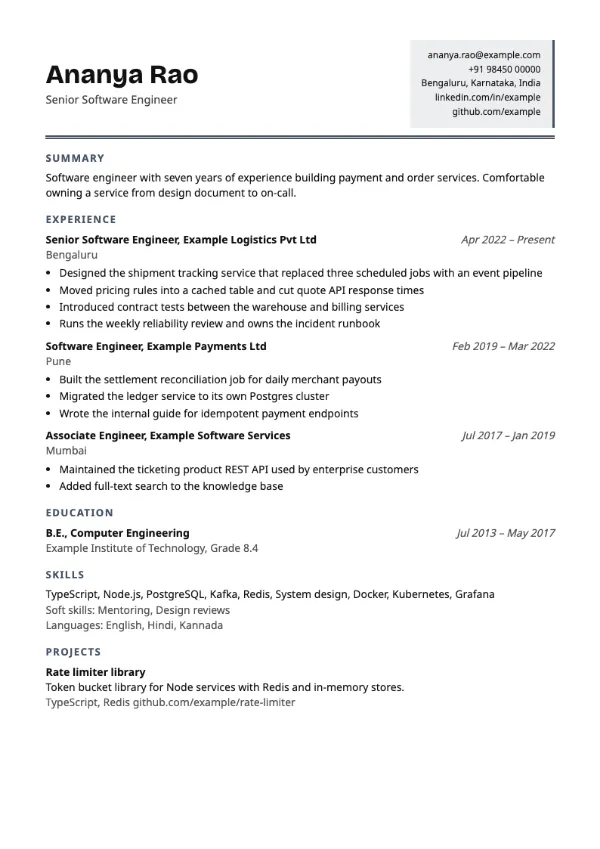
Preview with a fictional sample resume, in the default colour.
A split header with the name on the left and contacts in a tinted panel on the right.
| Detail | Statement |
|---|---|
| Layout | Single column |
| Applicant tracking systems | ATS-friendly |
| Photo | No photo area |
| Default colour | Slate |
| Other colours | 10 more, including black |
| Categories | ATS-friendly, Professional |
| Price | Free, including PDF download |
The header divides into two: your name and title on the left, and your contact details stacked in a pale panel with an accent edge on the right. A heavier double rule separates the header from the body. Dates are set in italics, and the body is one column in the usual order.
Client-facing professionals in sales, account management, consulting and recruitment, who want their name to stand out and their contact details to be easy to find at a glance.
The two-part header is the only split on the page; the body that carries your experience is a single column. Contact text is real text, not an image.
Include only the contact details a recruiter will use: one phone number, one email, your city and a profile link.
Build your resume with Statement
Create a free account, fill in your sections and download a PDF. You can switch templates at any time.