Groundwork
ATS-friendlyChronological, Professional
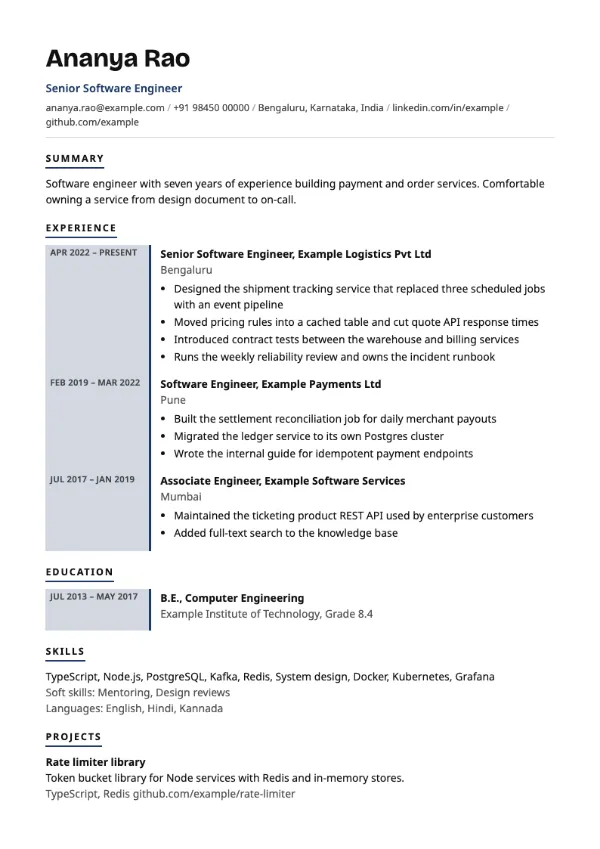
Preview with a fictional sample resume, in the default colour.
Dates set in their own left-hand column with a tinted rail beside every entry.
| Detail | Chronicle |
|---|---|
| Layout | Single column |
| Applicant tracking systems | ATS-friendly |
| Photo | No photo area |
| Default colour | Navy |
| Other colours | 10 more, including black |
| Categories | ATS-friendly, Chronological |
| Price | Free, including PDF download |
Each experience and education entry has its dates in an uppercase column on the left, about a third of the width of a sidebar, with a tinted rail and accent edge running down beside it. The role, company and bullets sit to the right. Headings have a short underline only.
Candidates with long, continuous careers in one industry, such as manufacturing, banking operations or teaching, and anyone whose dates are a strength rather than something to explain.
This is a chronological resume in one reading column. The date column is part of each entry rather than a separate sidebar, so dates stay attached to the right role when parsed.
Use the same date format for every row, for example Apr 2021 to Mar 2024. Mixed formats are very visible when dates are stacked in a column.
Build your resume with Chronicle
Create a free account, fill in your sections and download a PDF. You can switch templates at any time.