Creative, Modern
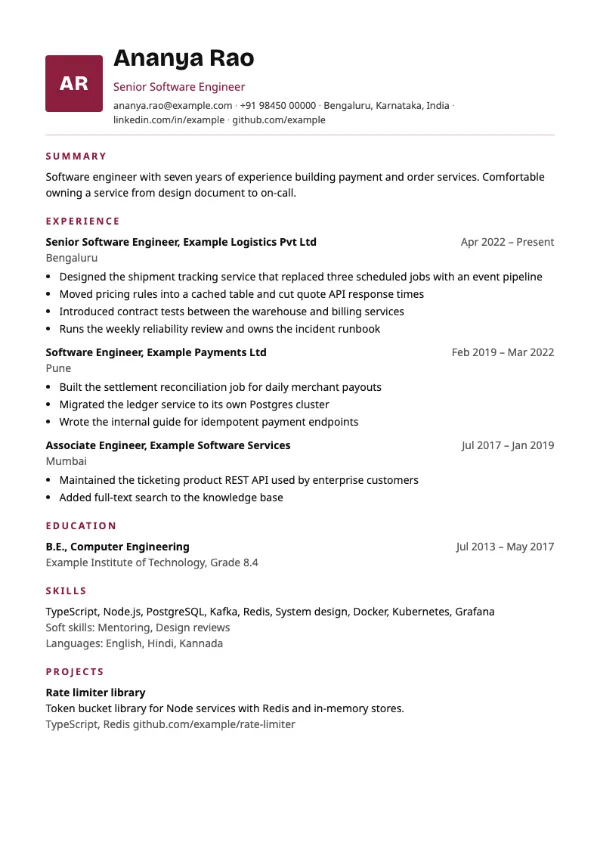
Preview with a fictional sample resume, in the default colour.
An initials badge in the accent colour beside your name.
| Detail | Monogram |
|---|---|
| Layout | Single column |
| Applicant tracking systems | Best for direct applications |
| Photo | No photo area |
| Default colour | Maroon |
| Other colours | 10 more, including black |
| Categories | Creative, Modern |
| Price | Free, including PDF download |
A square badge with your initials, maroon by default, sits beside the name at the top of the page, acting as a personal mark in place of a photo. The badge is left out automatically if no name is entered. Below the header, the content runs in one column in the standard order.
Freelancers, consultants and creative professionals who want a personal brand mark on their resume and cover letter, without using a photo.
The initials badge is a decorative element. The builder marks Monogram as not ATS-friendly, so prefer a plain single-column template for portal uploads even though the body is one column.
Use the same name on the resume as on your email address and profile links, so the initials match what the recruiter sees elsewhere.
Build your resume with Monogram
Create a free account, fill in your sections and download a PDF. You can switch templates at any time.