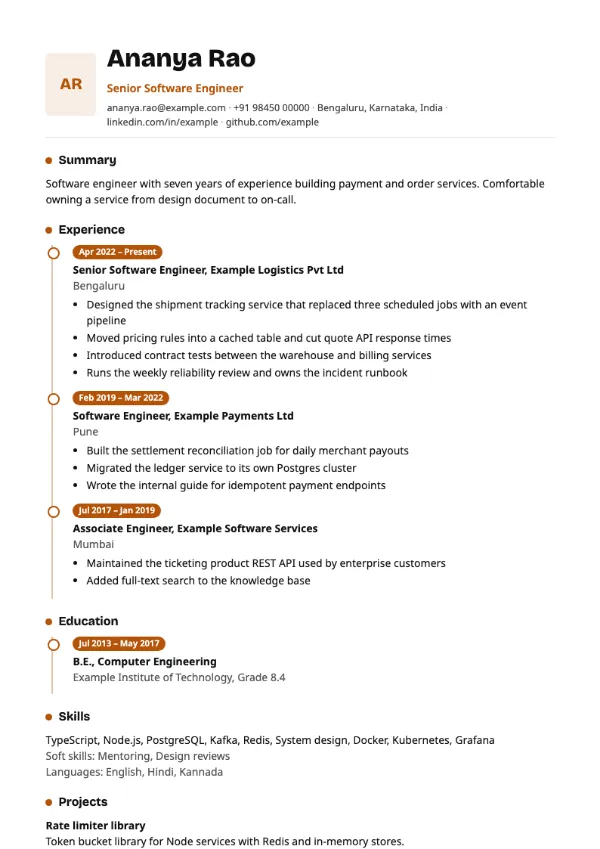
Timeline, Creative
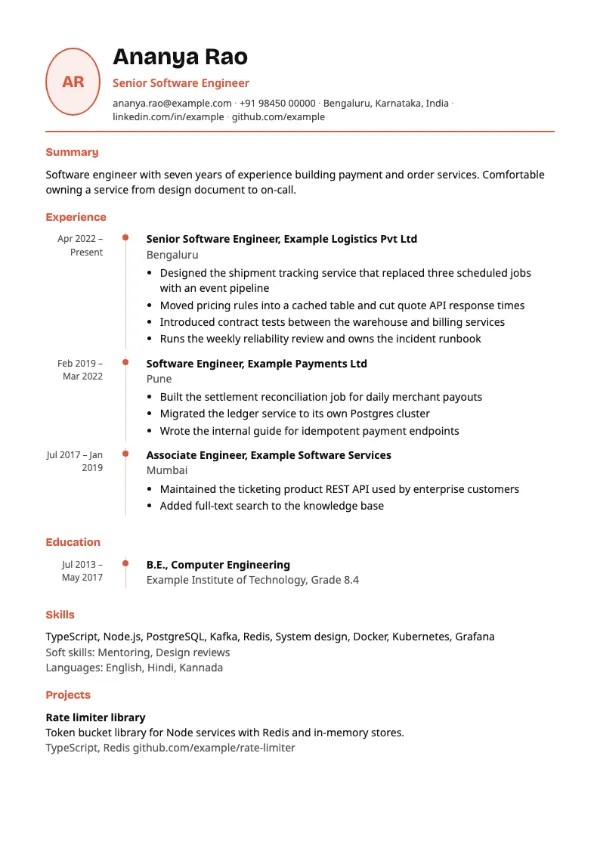
Preview with a fictional sample resume, in the default colour.
Experience and education on a vertical timeline, with an optional round photo beside the name.
| Detail | Timeline |
|---|---|
| Layout | Single column |
| Applicant tracking systems | Best for direct applications |
| Photo | Optional photo area |
| Default colour | Coral |
| Other colours | 10 more, including black |
| Categories | Creative, Timeline |
| Price | Free, including PDF download |
The header places an optional circular photo next to your name, with a coloured rule underneath. Experience and education are drawn along a vertical line with the dates of each entry marked against it, which makes the length of each role visible at a glance. Skills and projects follow below.
Candidates with a clear progression inside one field, such as engineer to lead or associate to manager, and people whose steady tenure is a selling point. It works well for printed interview copies.
The timeline line and markers are decoration around one column of text, but some parsers handle the dated layout less consistently. Prefer a plain single-column template for portal uploads.
A timeline makes gaps obvious. If you took a career break, add it as a short entry with one line on what you did, rather than leaving a hole in the line.
Build your resume with Timeline
Create a free account, fill in your sections and download a PDF. You can switch templates at any time.