Two-column, Professional
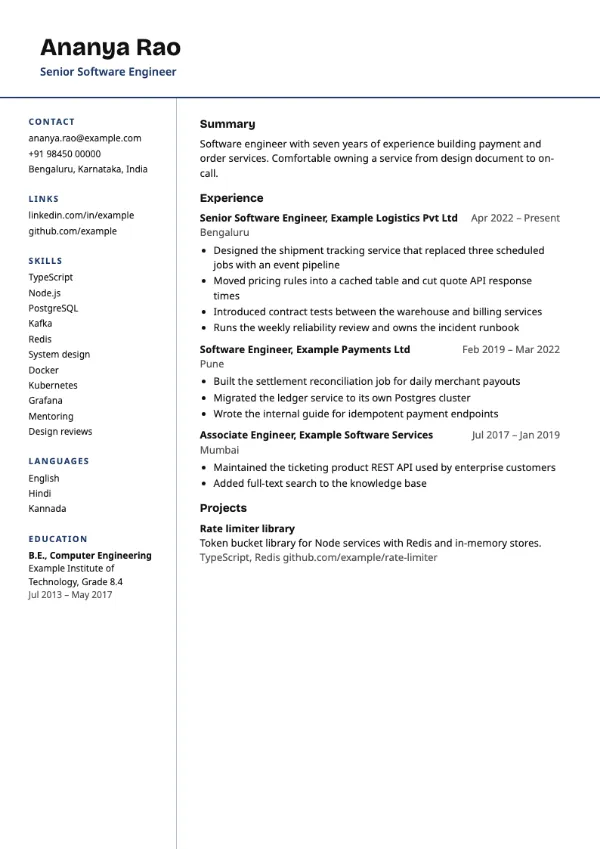
Preview with a fictional sample resume, in the default colour.
A full-width header above a white left column that holds contact, skills, languages and education.
| Detail | Column Pro |
|---|---|
| Layout | Two columns |
| Applicant tracking systems | Best for direct applications |
| Photo | No photo area |
| Default colour | Navy |
| Other colours | 10 more, including black |
| Categories | Two-column, Professional |
| Price | Free, including PDF download |
The name and title span the full width at the top of the first page. Below, a white left column divided from the main content by a rule holds your contact details, links, skills, languages and education. The main column carries the summary, experience and projects.
Experienced professionals in technology, consulting and management who want a clean two-column page with no heavy colour, mainly for direct applications and interviews.
Two-column layouts are read less reliably by some applicant tracking systems. Moving education to the sidebar also means a parser may not find it where it expects. Use a single-column template for portals.
Because education sits in the narrow column, write it compactly: degree, institution and year on two lines.
Build your resume with Column Pro
Create a free account, fill in your sections and download a PDF. You can switch templates at any time.