Two-column, Professional
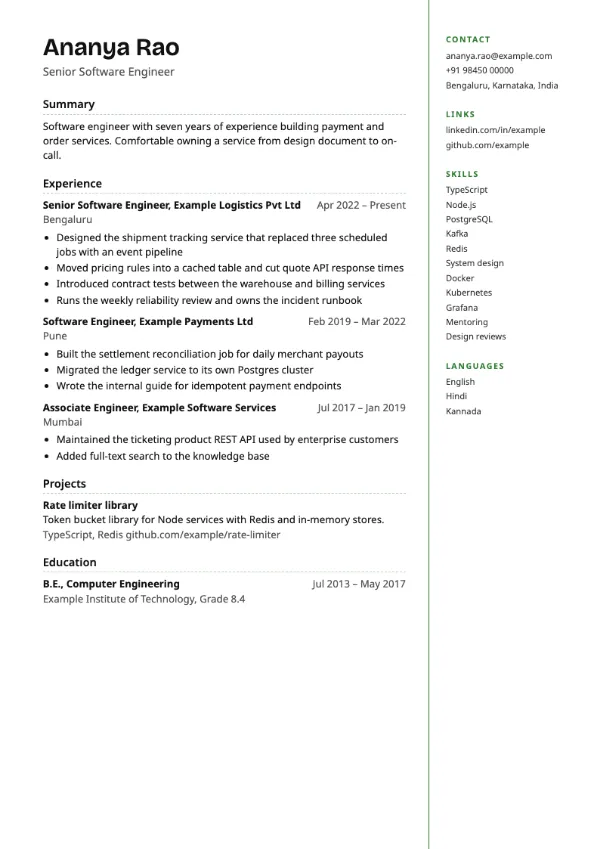
Preview with a fictional sample resume, in the default colour.
A narrow right column separated by an accent rule, with no fill.
| Detail | Margin Notes |
|---|---|
| Layout | Two columns |
| Applicant tracking systems | Best for direct applications |
| Photo | No photo area |
| Default colour | Green |
| Other colours | 10 more, including black |
| Categories | Two-column, Simple |
| Price | Free, including PDF download |
Your name and the main content sit in the wide left column. A narrow right column, separated by a thin accent rule and left unfilled, carries contact details, links, skills and languages like notes in a margin. It is the lightest of the two-column designs.
Researchers, writers, analysts and teachers who want a two-column structure but prefer a quiet page, for direct applications and printed interview copies.
Even without a coloured fill, the right column is a separate column and may be read out of order. Use a single-column template for portal uploads.
Margin notes should be scannable. Use single words and short phrases, and keep full sentences in the main column.
Build your resume with Margin Notes
Create a free account, fill in your sections and download a PDF. You can switch templates at any time.