Traditional
ATS-friendlyProfessional, Traditional
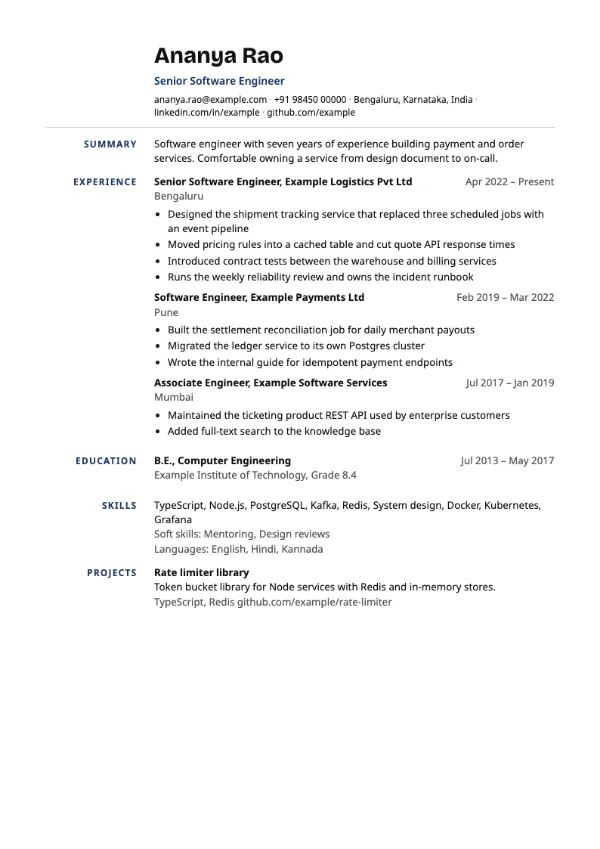
Preview with a fictional sample resume, in the default colour.
Section headings in a right-aligned left margin, with content offset beside them.
| Detail | Ledger |
|---|---|
| Layout | Single column |
| Applicant tracking systems | Best for direct applications |
| Photo | No photo area |
| Default colour | Navy |
| Other colours | 10 more, including black |
| Categories | Professional, Traditional |
| Price | Free, including PDF download |
Instead of sitting above each section, headings are placed in a narrow left margin and aligned to the right, so they line up against the content like the labels in an account book. The content column sits beside them. It is orderly and distinctive without using colour blocks.
Finance, audit, compliance and legal professionals who want a precise, structured look, mainly for direct applications and printed copies.
Because headings sit beside rather than above the content, some parsers pair them with the wrong text. The builder marks Ledger as not ATS-friendly; use Traditional or Keystone for portal uploads.
Margin headings must be short to fit. Use Experience, Education, Skills and Projects rather than longer phrases.
Build your resume with Ledger
Create a free account, fill in your sections and download a PDF. You can switch templates at any time.