Capability
ATS-friendlySkills-based
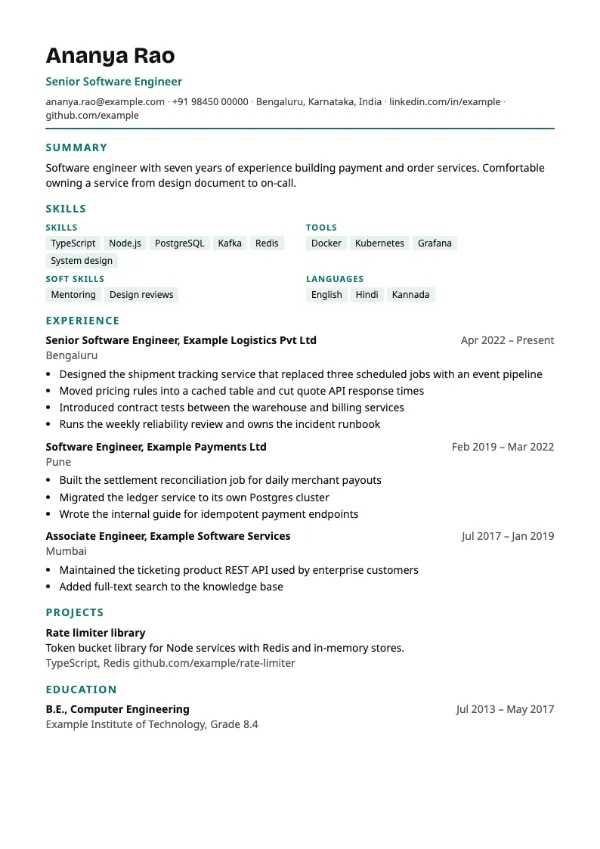
Preview with a fictional sample resume, in the default colour.
Grouped skills placed directly under the summary, before any work history.
| Detail | Skills First |
|---|---|
| Layout | Single column |
| Applicant tracking systems | ATS-friendly |
| Photo | No photo area |
| Default colour | Teal |
| Other colours | 10 more, including black |
| Categories | Skills-based |
| Price | Free, including PDF download |
After the header and summary, the first section is a grouped skills block that separates technical skills, tools, soft skills and languages. Experience follows, then projects and education. Headings are uppercase in the accent colour, and the page stays in one column throughout.
Career changers, freshers with strong technical skills, and candidates applying for roles where a screener filters on a tool list first, such as data, testing, cloud and support roles.
Placing skills high on the page puts your keywords where both the parser and a skimming recruiter meet them early. The groups are plain lists rather than a table.
Only list a skill you can discuss for five minutes in an interview. A long list of tools you used once invites questions you cannot answer well.
Build your resume with Skills First
Create a free account, fill in your sections and download a PDF. You can switch templates at any time.